

DriveSchool
Learners, lesson booking, LL/DL tracking, fees and fleet for driving schools — without paper registers.





Overview
What DriveSchool is
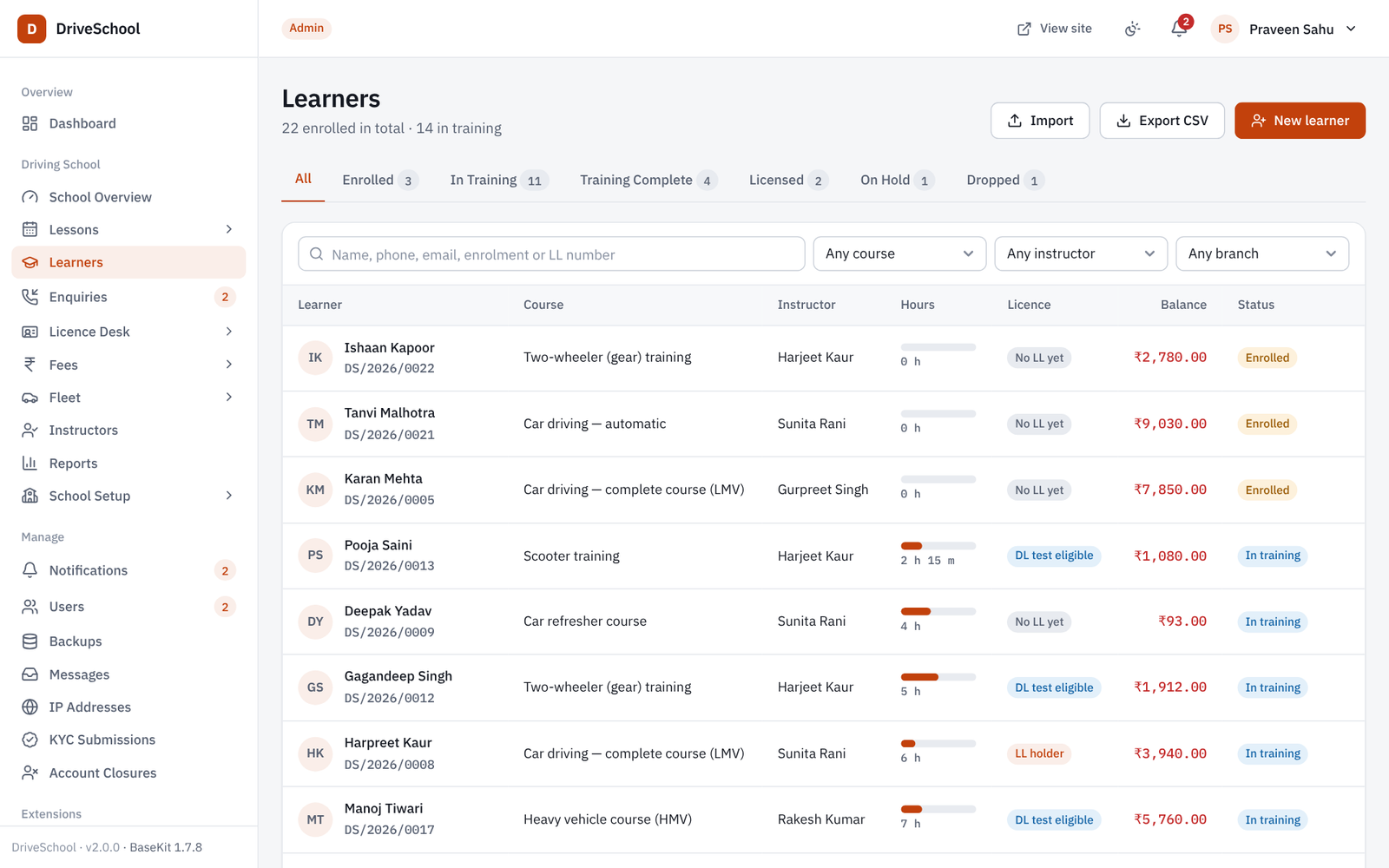
DriveSchool is management software for motor driving training schools and accredited driver training centres. It replaces the paper registers and the booking diary: every learner has a record, every lesson is booked against an instructor and a vehicle, and Form 14, Form 15, Form 5 and the fee receipts are ready to print at any time.
Booking without clashes
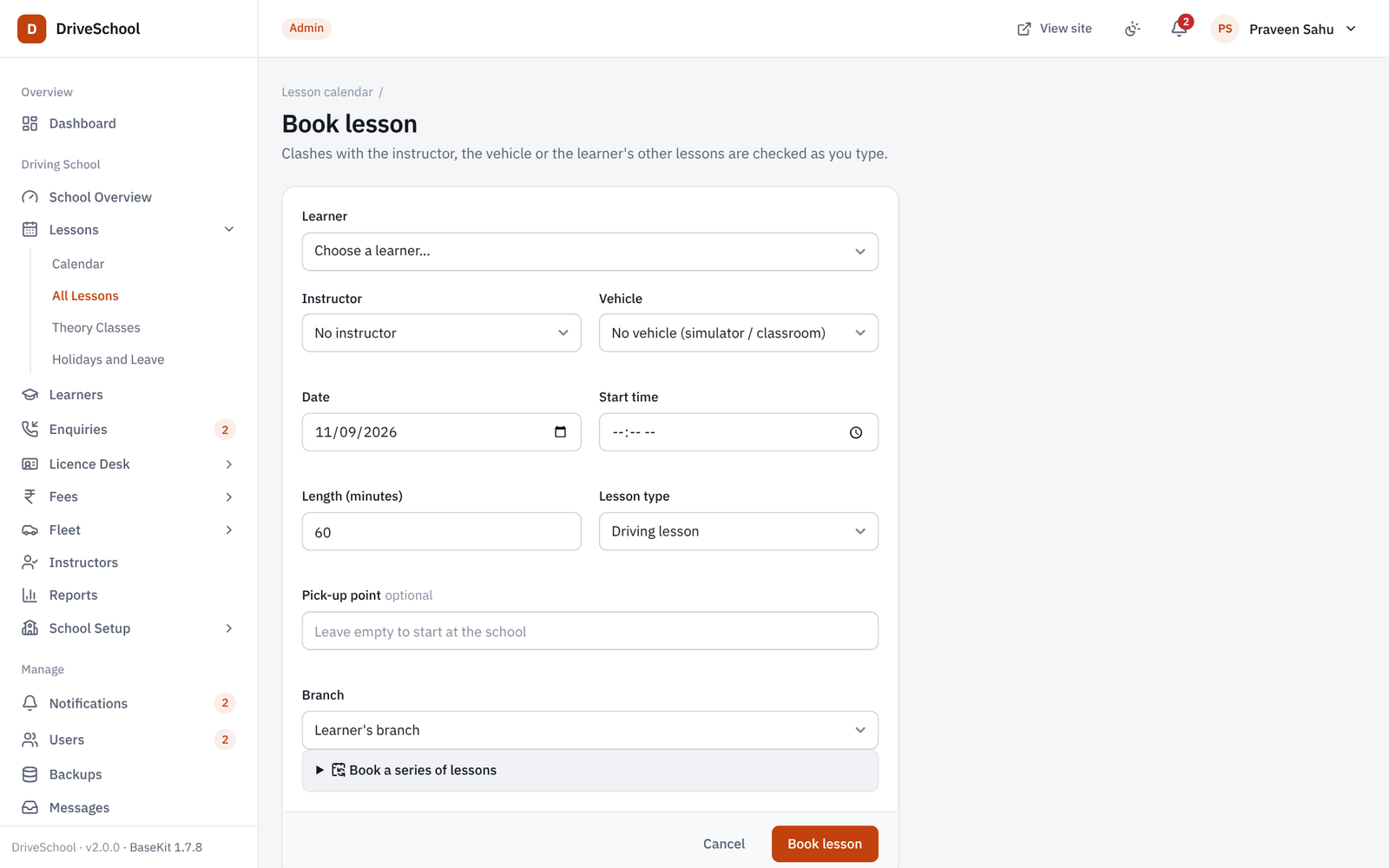
The lesson calendar shows the day or week by instructor or by vehicle. A booking is checked against the instructor, the vehicle and the learner, school hours, holidays, approved leave and vehicles off the road, and two people can never take the same slot at once. Lessons can repeat over several weeks, and learners can book, move or cancel their own lessons from their portal within the limits you set.
Hours, skills and certificates
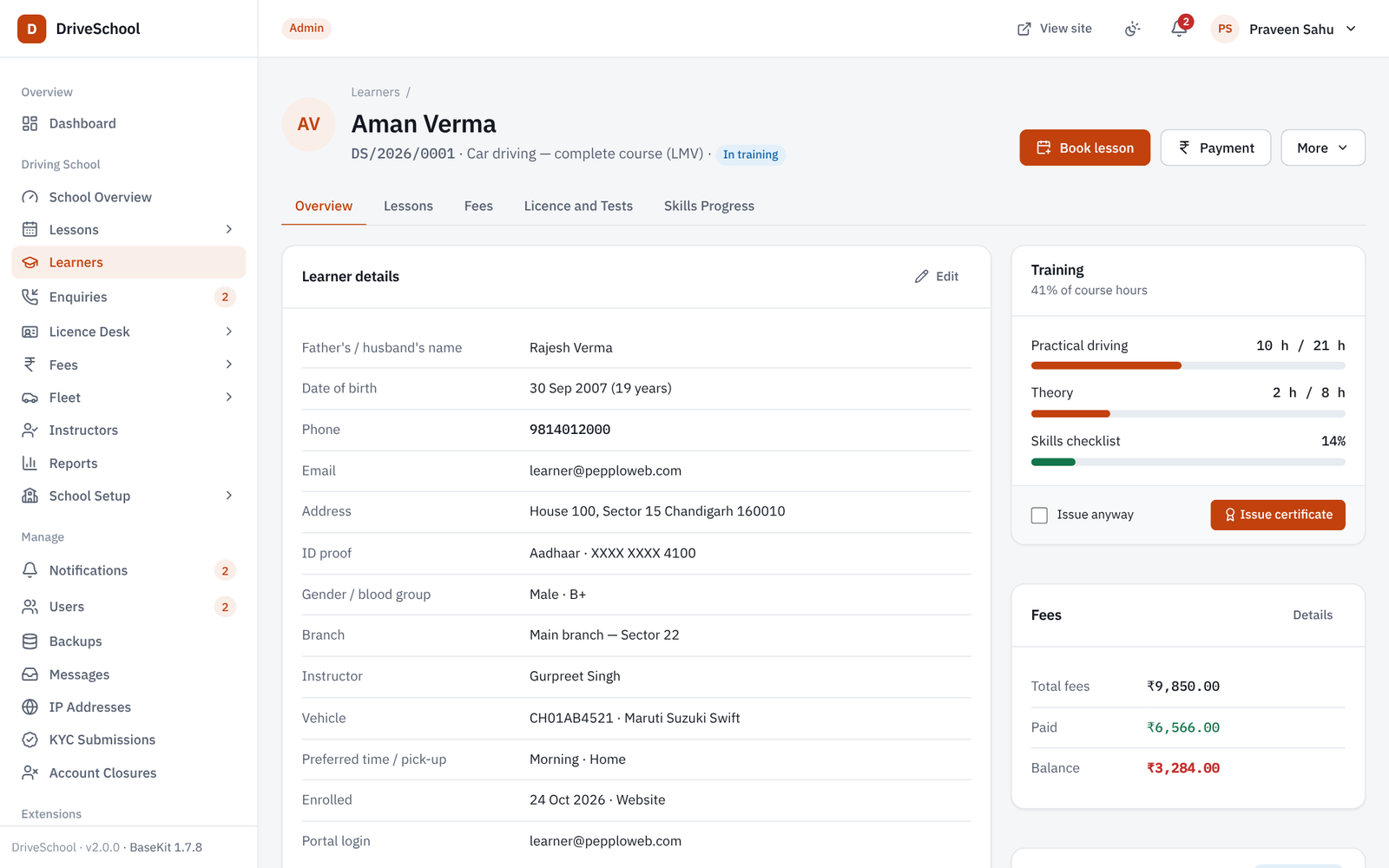
Each recorded lesson adds to the learner's practical hours (odometer readings update the vehicle), theory classes add theory hours with attendance, and a 52-item skills checklist rates progress. The course certificate is refused until the required hours are complete, and anyone can check a certificate on your website.
Licence desk
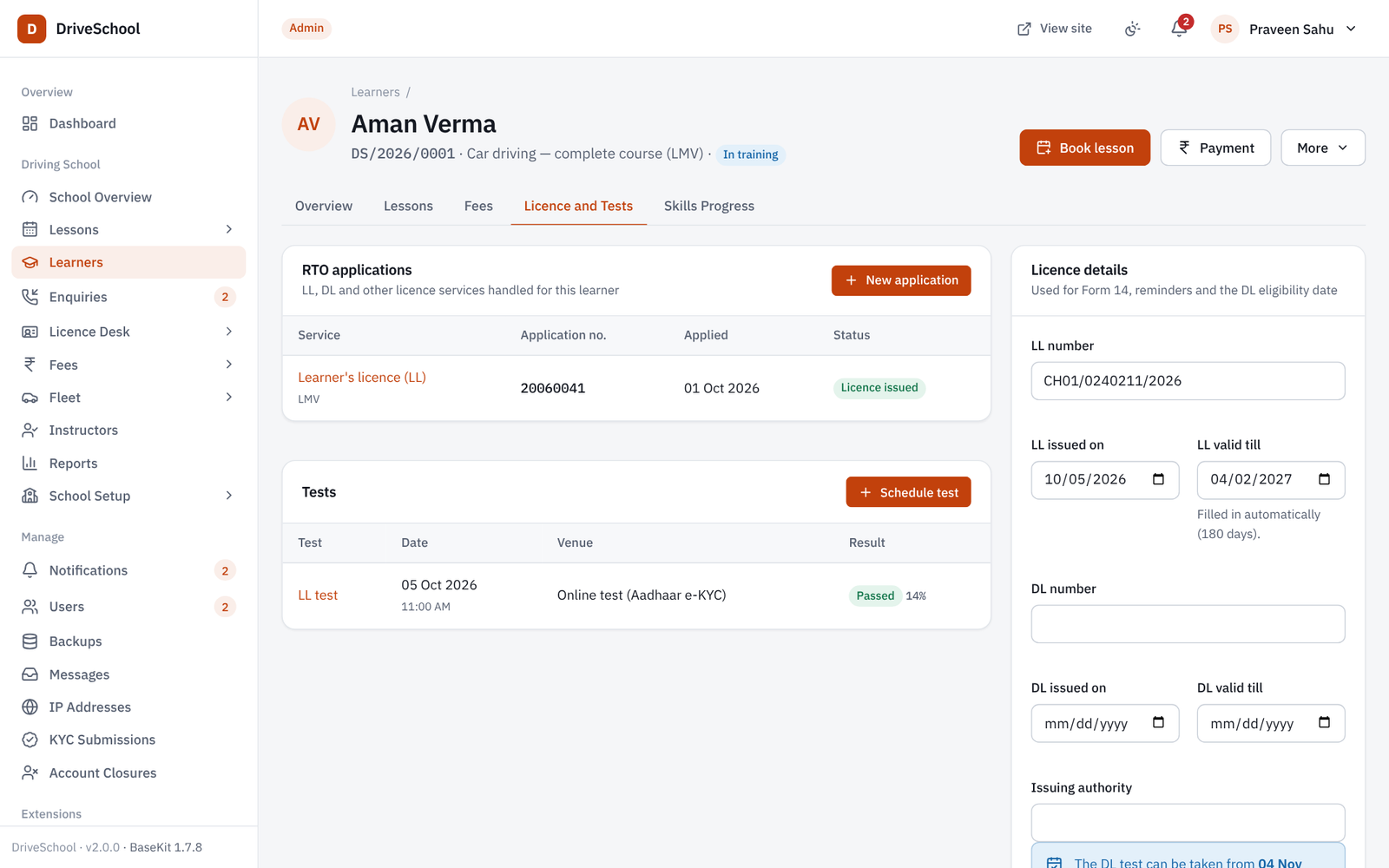
Track learner's licence and driving licence applications with the Sarathi application number, RTO office and status, and schedule LL tests, DL tests and in-house assessments. When an LL test is passed, the LL number and its 180-day validity are stored; DL-test eligibility after 30 days and retests after 7 days follow the Central Motor Vehicles Rules, and every number is a setting.
Fees and accounts
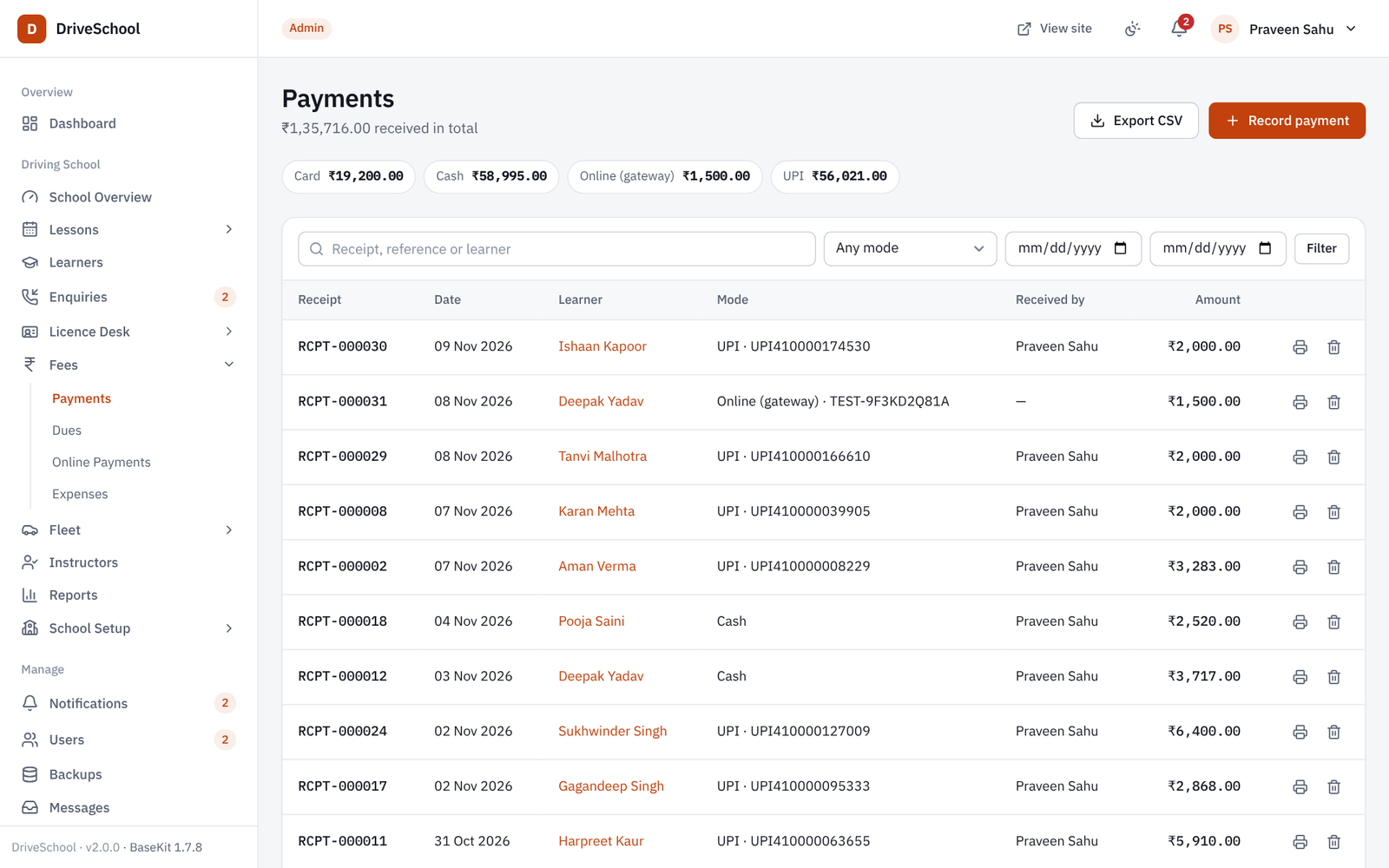
Course fees on enrolment, extra charges with GST, discounts, instalment plans and a dues list with one-click reminders. Receipts are numbered and show the amount in words; the fee statement works as a GST invoice. Learners pay online by UPI with a reference your office checks, by Razorpay Payment Links or by the test gateway. Expenses are recorded by category, vehicle and branch.
Fleet
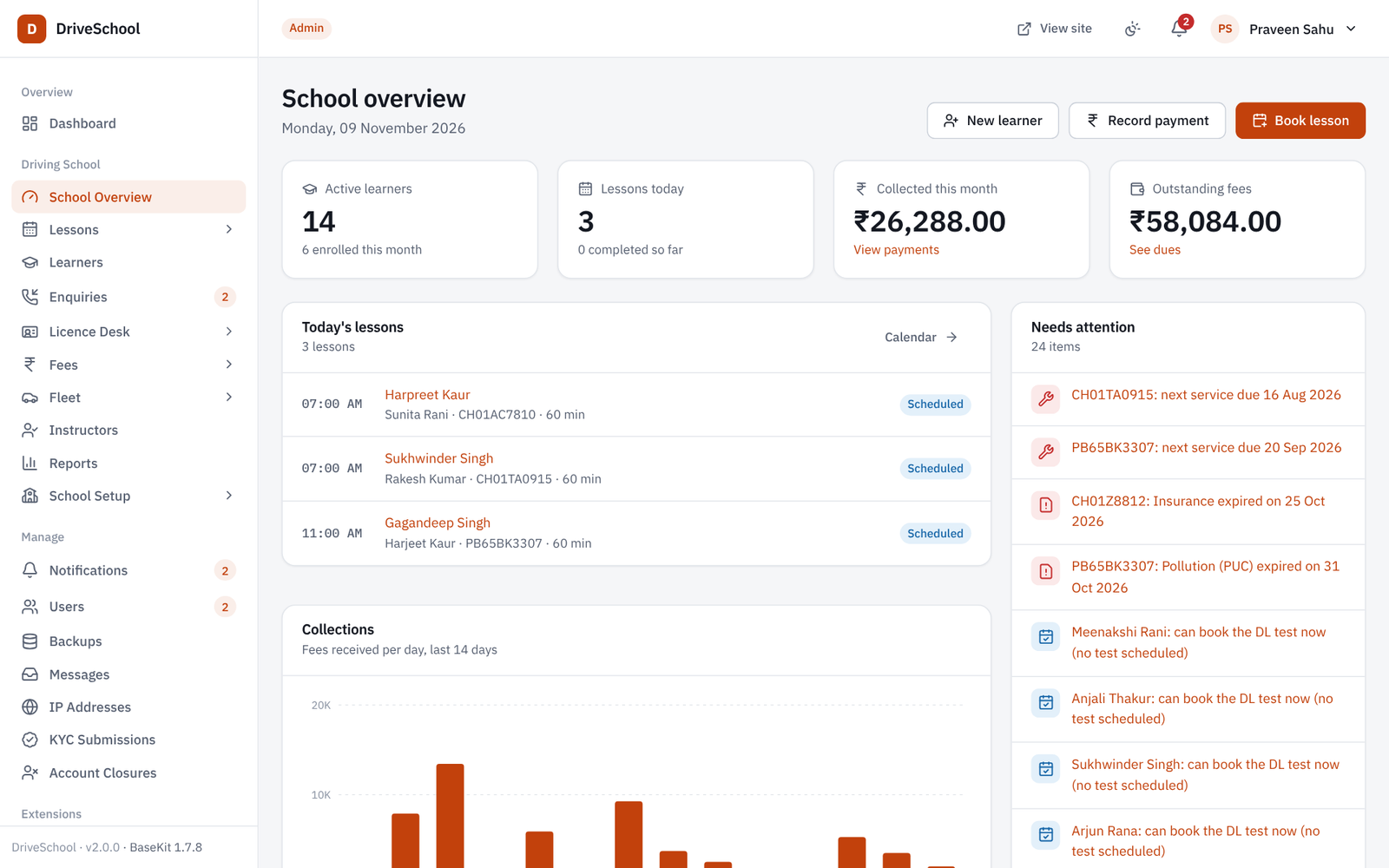
Vehicles with registration, class, transmission and dual control; RC, insurance, PUC, fitness, permit and road-tax documents with expiry alerts; a service and repair log with next due date or km; a fuel log with cost per km.
Portals and website
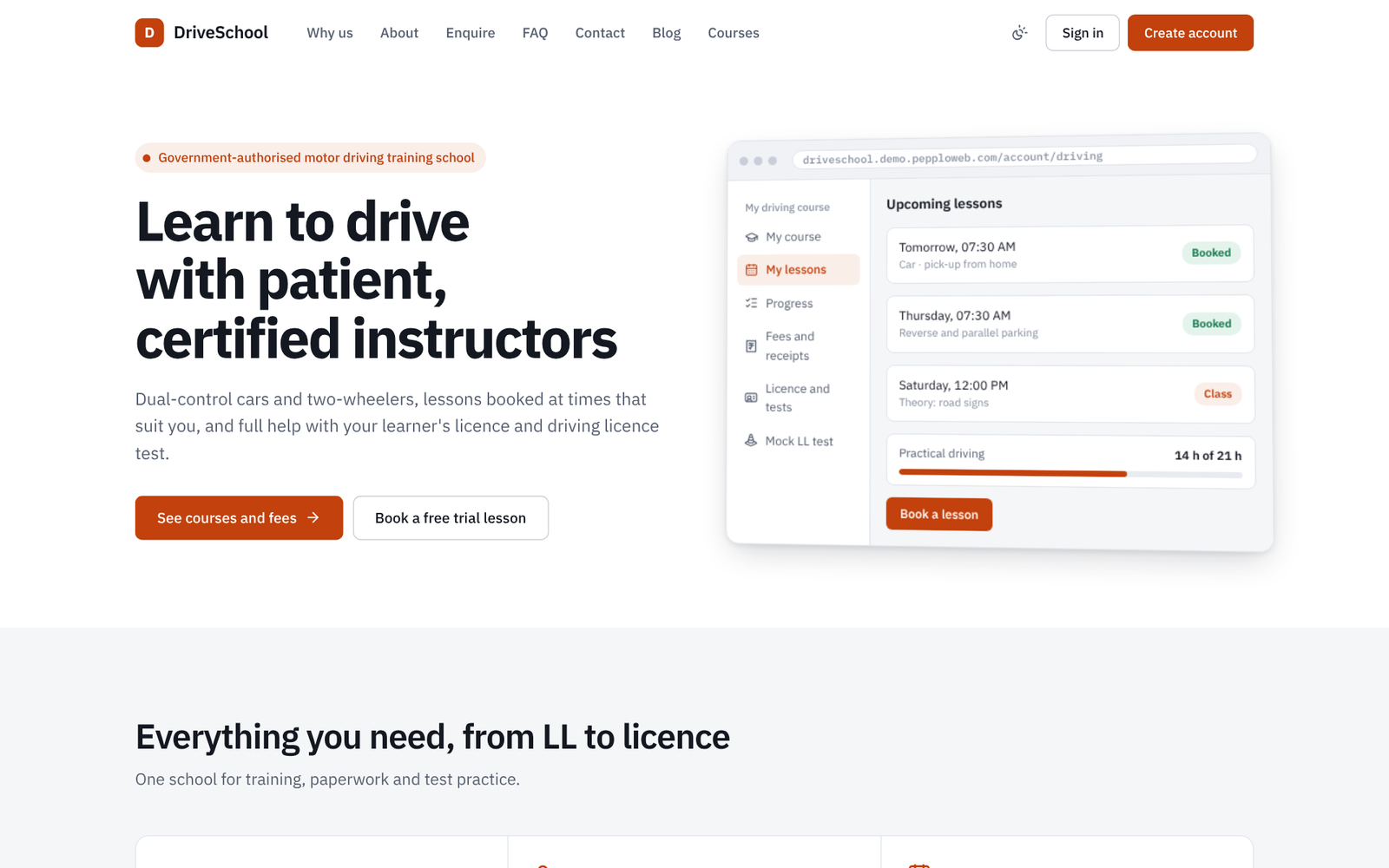
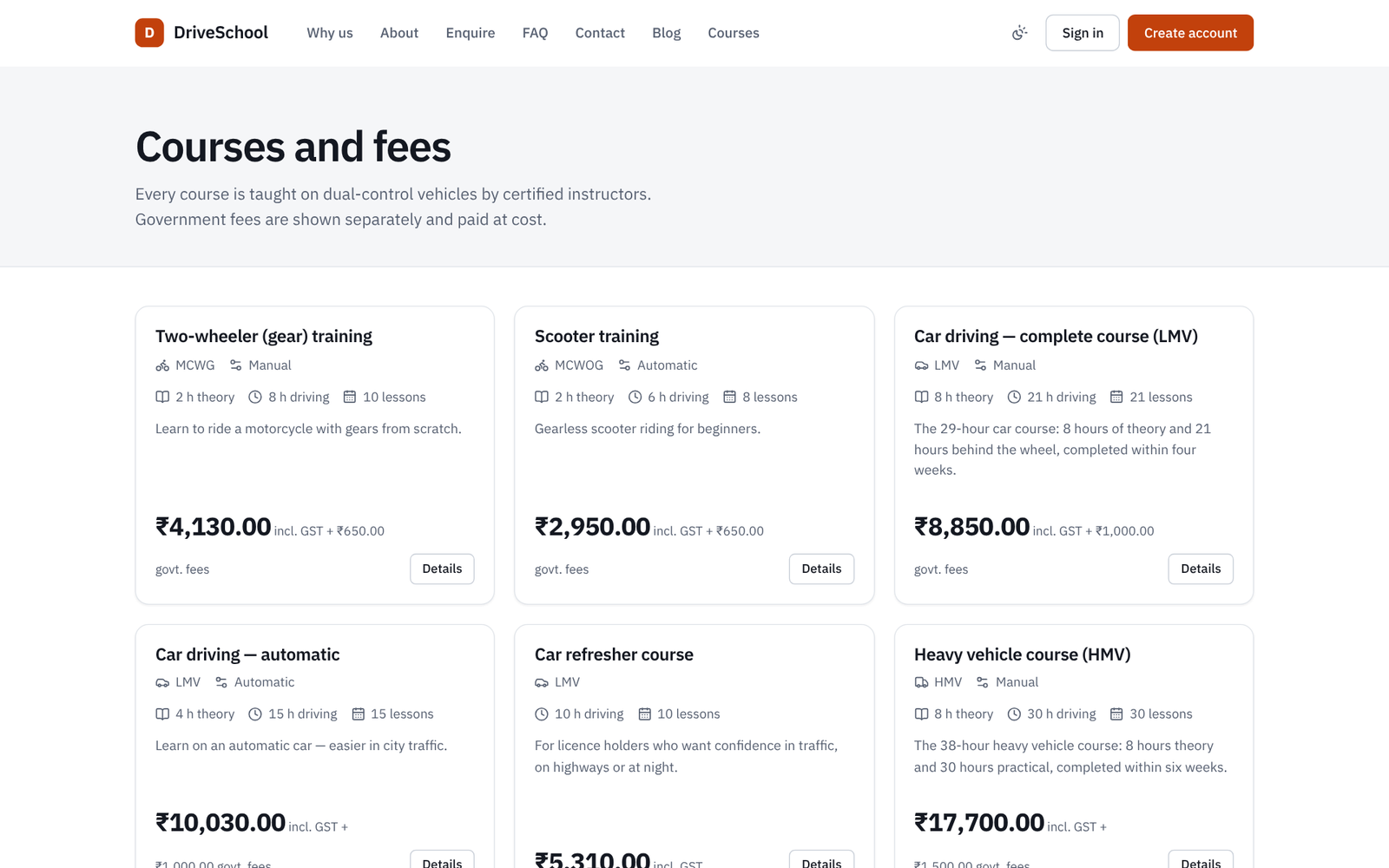
Learners see their course, hours, lessons, fees and licence status, book lessons and practise a road-sign mock test. Instructors see their day, record lessons and skills, mark attendance, see their hours and pay and ask for leave. The website gets a driving-school homepage, a courses-and-fees page and an enquiry form whose enquiries the office follows up and converts into learners.
Built on BaseKit
DriveSchool runs on BaseKit 1.7.8: web installer, PepploWeb Marketplace licensing, one-click updates, admin, learner and instructor panels, staff permissions, two-step sign-in, GDPR tools, notification centre, cron jobs page, database backups and demo mode.
DriveSchool is a product of Pepplo Web Technologies and DOMAINSROCK PRIVATE LIMITED.
- Learner enrolment with Form 14, Form 15 and Form 5
- Slot booking per instructor and vehicle, without clashes
- Practical and theory hours with a 52-item skills checklist
- LL / DL applications, tests and eligibility dates
- Fees, instalments, GST receipts and online payment
- Fleet documents, service and fuel logs with expiry alerts
- Learner and instructor portals, mock LL test
- Registers and reports with CSV export
- Web installer, one-click updates and demo mode
Features
Learners
- Enrolment form with guardian, DOB, blood group, ID proof, address and photo
- Automatic enrolment numbers (prefix / year / 0001)
- Learner page with lessons, fees, licence and tests, skills progress
- Status from enrolled to licensed, plus on hold and dropped
- Sarathi document checklist
- CSV import from paper registers, with template
- Enquiries with follow-up dates, converted to learners
Lesson booking
- Day and week calendar by instructor or by vehicle
- Clash checks for instructor, vehicle and learner
- School hours, holidays, leave and vehicles off the road respected
- Booking lock: one slot can never be taken twice
- Repeat bookings over several weeks
- No-show and cancellation with reason and message
Hours and progress
- Practical and theory hours against the course (e.g. LMV 29 h)
- Lesson record with minutes, odometer, topics and remarks
- 52-item skills checklist by vehicle type
- Theory classes with capacity and attendance
- Certificate only when the hours are complete (override available)
- Public certificate check on the website
Licence desk
- LL, DL, renewal, add class, duplicate, address change and IDP applications
- Sarathi application number, RTO office, fee and status
- LL tests, DL tests and in-house assessments
- LL number and 180-day validity stored on a pass
- DL eligibility after 30 days, retest after 7 days (settings)
- Alerts for DL-eligible learners and LLs about to expire
Fees and accounts
- Course fee on enrolment, extra charges with GST, discounts
- Instalment plans, dues list and one-click reminders
- Numbered receipts with the amount in words (lakh / crore)
- Fee statement as a GST invoice (CGST + SGST or IGST)
- Online payment by UPI reference, Razorpay Payment Links or test gateway
- Expenses by category, vehicle and branch
Fleet
- Vehicles with class, transmission, fuel, dual control and odometer
- RC, insurance, PUC, fitness, permit and road tax with expiry alerts
- Service and repair log with next due date or km
- Fuel log, distance and running cost per vehicle
Portals
- Learner: course, hours, lessons, booking, fees, receipts, licence status
- Learner: pay online and practise the mock LL test (48 questions)
- Instructor: day schedule, record lessons and skills, attendance
- Instructor: learners, hours and pay, leave requests
- Calendar feed for learners and instructors
Registers and reports
- Print Form 5, Form 14, Form 15, certificate, receipt, fee statement and ID card
- Income and expenses, collections and GST, outstanding fees
- Instructor hours and pay, vehicle use, enrolments by course
- Test pass rates and enquiry conversion
- Every report prints and downloads as CSV
Admin and operations
- Driving School group first in the sidebar, with counts of enquiries to follow up
- Staff permissions for schedule, learners, licence desk, fees, fleet, reports and setup
- Email and SMS templates for bookings, receipts, dues, tests and LL expiry
- Hourly reminders and a daily alerts digest by cron
- Cron jobs page, backups and activity log
- Demo mode with automatic reset
Security
- Two-step sign-in and encrypted sign-in form
- Receipt, enrolment and certificate numbers never reused
- Razorpay webhook checked by signature; a UPI reference used only once
- Allow-list HTML sanitiser and baseline CSP
- Uploads checked by content
- Signed, sealed license file
Buy a license
| Plan | Sites | Updates | Support | Price | |
|---|---|---|---|---|---|
| Annually | 1 | 6 months | 3 months | ₹7,999 | Sign in to buy |
| Biennially | 1 | 12 months | 6 months | ₹14,999 | Sign in to buy |
| Triennially | 1 | 18 months | 9 months | ₹19,999 | Sign in to buy |
| Lifetime | 1 | 12 months | 12 months | ₹29,999 one-time |
Sign in to buy |
Extensions
All extensions are inside the main download. Driving School, Captcha, Pages and Blogs are included free with every license; paid extensions unlock as soon as you buy them for your DriveSchool license.
Included with every license
The DriveSchool product itself: learners, lesson booking per instructor and vehicle, hours and skills, LL/DL applications and tests, fees and receipts, fleet, portals, registers and reports.
Details
Driving School is the product: everything described on this page. It is always installed, cannot be switched off and is included with every license.
Each part (learner self-booking, theory classes, mock LL test, courses page and enquiry, certificate check, instructor portal, online fee payment, automatic reminders) can be switched on or off under Extensions.
- Learners with Form 14, Form 15 and Form 5
- Lesson booking per instructor and vehicle
- LL / DL applications and tests
- Fees, instalments, GST receipts and online payment
- Fleet documents, service and fuel logs
- Each part can be switched on or off
Works with version 2.0.0 or newer.
Built-in image captcha or Google reCAPTCHA v2/v3 on sign-in, sign-up, password reset and contact forms.
Details
Captcha protects your public forms from automated sign-ups and spam. Use the built-in image captcha, which needs no outside account, or Google reCAPTCHA v2 (checkbox) or v3 (invisible score).
Choose which forms are protected, so honest visitors on low-risk forms are never slowed down. Captcha is part of every BaseKit product and is always included.
- Built-in image captcha, no third-party account
- Google reCAPTCHA v2 checkbox and v3 invisible score
- Choose which forms are protected
- Adjustable reCAPTCHA v3 score threshold
- Works with light and dark themes
Works with version 2.0.0 or newer.
Create unlimited static pages and add them to the header or footer; starter About, Privacy, Terms, Refund and Shipping pages are created on install.
Details
Pages lets you publish any static page: About us, policies, landing pages. Starter pages are created on install with your company details filled in, so payment gateways can review your site quickly.
Each page has its own SEO title and description and can be linked from the header or the footer.
- Unlimited pages with a rich editor
- Starter About, Privacy, Terms, Refund and Shipping pages
- Company details filled in automatically
- Header and footer links
- SEO title and description per page
Works with version 2.0.0 or newer.
A blog with categories, cover images, comments and a latest-posts section for the homepage.
Details
Blogs adds a full blog to your site: posts with cover images, categories, comments you moderate, and a latest-posts section you can place on the homepage.
Posts are listed in the sitemap for search engines and the assistant can answer from them.
- Posts with cover images and categories
- Moderated comments
- Latest-posts homepage section
- Header menu link
- Posts in the sitemap
Works with version 2.0.0 or newer.
Paid extensions
Sign in and buy DriveSchool to add extensions to your license.
Online gateways that confirm payments automatically (QRPayments, PhonePe, Razorpay, Cashfree, Paytm, PayU, Instamojo, CCAvenue, Easebuzz, Stripe, PayPal, Flutterwave), plus wallet top-ups, pay-from-wallet and withdrawals.
Details
BaseKit's core already takes payments by manual UPI or bank transfer, confirmed by you. Wallet & Payments adds twelve hosted gateways that confirm payments on their own: the customer pays on the gateway's page, and the return and the webhook are both verified with the gateway and the amount is checked before the order is paid.
It also adds a customer wallet. Users top up with any gateway, pay orders from their balance in one click, and can withdraw by UPI, bank transfer or PayPal with your own limits and charges. Every movement is written to a locked ledger, and admins can credit or debit a wallet with a reason the user sees.
Admins get alerts for new payments, payments waiting for confirmation, amount mismatches and withdrawal requests.
DriveSchool's own fee payments (UPI reference and Razorpay Payment Links) work without this extension; Wallet & Payments adds the other gateways and the wallet for BaseKit orders.
- QRPayments, PhonePe, Razorpay, Cashfree, Paytm, PayU and Instamojo
- CCAvenue, Easebuzz, Stripe, PayPal and Flutterwave
- Returns and webhooks verified, amount checked before an order is paid
- Wallet top-up and pay from wallet at checkout
- Withdrawals by UPI, bank or PayPal with limits and charges
- Credit or debit any wallet with a reason
- Alerts for payments, mismatches and withdrawals
Needs: An account with the payment gateways you want to use; SSL certificate (HTTPS) for gateway returns
Works with version 2.0.0 or newer.
Answers visitors and customers from your pages, help articles, blog posts and your own answers, and hands questions it cannot answer to your team.
Details
Website Assistant reads your website (pages, help articles, blog posts, contact details and your own extra answers) and answers visitors and signed-in users in a chat window. It works with Claude or any OpenAI-compatible model, or in search-only mode without AI.
Signed-in users can ask about their own records, such as tickets or orders, and only their own data is ever read. When it cannot answer, it offers to send the question to your team as a support request.
- Answers from pages, help articles, blog posts and FAQs
- Claude, OpenAI-compatible models or search-only mode
- Users' own records, read-only
- Hands unanswered questions to your team
- Conversation log and feedback for admins
- Guests on or off, and shown in the user panel
Needs: An API key for Claude or an OpenAI-compatible model (optional; search-only mode needs none)
Works with version 2.0.0 or newer.
Your users chat with Claude, choose a model, keep their history and spend credits metered by usage.
Details
AI Assistant turns your site into an AI chat service. Users chat with Claude, pick a model, keep their conversations and spend credits that are metered by the tokens each reply uses.
You set the models, prices and limits; staff never see the API key.
- Chat with Claude models
- Conversation history, rename and delete
- Credits metered by usage
- Choose which models users can pick
- Admin settings for models and limits
Needs: An Anthropic API key
Works with version 2.0.0 or newer.
Users open tickets with a department and priority, attach a file and exchange replies with your staff.
Details
Support Tickets adds a help desk to the user panel. Users open a ticket in a department with a priority and an attachment, and follow the replies by email.
Staff answer from the admin panel, and admins are alerted to new tickets and replies.
- Departments and priorities
- File attachments checked by content
- Email when staff reply
- Alerts for new tickets and replies
- Staff permission to manage tickets
Works with version 2.0.0 or newer.
Help articles in categories with search, so visitors find answers themselves.
Details
Knowledge base publishes help articles in categories with a search box and a Help link in the header.
The Website Assistant answers from these articles too.
- Articles in categories
- Search
- Header Help link
- Articles in the sitemap
- Used by the Website Assistant
Works with version 2.0.0 or newer.
A chat bubble on your website; admins and staff reply from the admin panel.
Details
Live Chat puts a chat bubble on your website. Visitors write, and admins and staff reply from the admin panel.
The team is alerted when a new conversation starts.
- Chat bubble on every page
- Replies from the admin panel
- Alerts for new chats
- Works with the Website Assistant
Works with version 2.0.0 or newer.
Banner adverts or ad-network code in placements across your website, with dates and impression and click counts.
Details
Ad Manager shows image banners or ad-network code (such as Google AdSense) in placements on your public website, with a start and end date.
Impressions and clicks are counted. Only admins can add ad code; staff can manage image adverts.
- Image banners and ad-network code
- Placements across the site
- Start and end dates
- Impression and click counts
- ads.txt
Works with version 2.0.0 or newer.
Dashboard and homepage announcements for all users, members or staff, with dates.
Details
Announcements shows messages on the user and admin dashboards and, if you like, as a banner or popup on the homepage.
Choose who sees each one and when.
- Dashboard banners
- Homepage banner or popup
- Audience: everyone, members or staff
- Start and end dates
Works with version 2.0.0 or newer.
Turn long links into short ones on your domain and count the clicks.
Details
Short URL makes short links on your own domain and counts how often each one is clicked.
- Short links on your domain
- Click counts
- Custom aliases
Works with version 2.0.0 or newer.
Page views per day, top pages, referrers, browsers and devices.
Details
Visitors History records page views on your public website and shows visits per day, top pages, referrers, browsers and devices.
- Visits per day
- Top pages and referrers
- Browsers and devices
- No outside analytics account
Works with version 2.0.0 or newer.
Block unwanted email addresses or domains, keep users to one session, and sign idle users out.
Details
Security blocks registrations and sign-ins from email addresses or domains you list, keeps each user to a single active session, and signs people out after a period of inactivity.
- Email and domain blacklist
- One active session per user
- Idle sign-out
- Admin-only options
Works with version 2.0.0 or newer.
Warns admins, or blocks the IP, when many accounts register or sign in from the same IP address.
Details
IP Abuse Monitor watches for many accounts registering or signing in from one IP address within a day, week or month. When a limit is reached it alerts the admins and can block the address.
- Limits per day, week or month
- Alerts to admins
- Optional automatic IP block
- Review the accounts by IP
Works with version 2.0.0 or newer.
Bundles
All Extensions
₹7,999Every premium extension available today and every one released later, for your DriveSchool license.
- All current premium extensions
- Every future premium extension included
- Best value
DriveSchool Complete
₹35,999A DriveSchool Lifetime license with every premium extension, current and future.
- DriveSchool Lifetime license
- All current and future premium extensions
Essential Pack
₹3,999Help and talk to your learners.
- Support Tickets
- Knowledge base
- Live Chat
- Announcements
Contains: Website Assistant, Support Tickets, Knowledge base, Live Chat, Announcements
Security Pack
₹2,999Keep spam accounts and abuse out.
- Security
- IP Abuse Monitor
- Visitors History
Contains: Visitors History, Security, IP Abuse Monitor
Requirements
- PHP
- 8.2 or newer
- Database
- MySQL 5.7+, MariaDB 10.3+, SQLite 3.35+
- PHP extensions
- pdo, mbstring, openssl, tokenizer, json, ctype, fileinfo, xml, curl, sodium, zip, gd
- Server
- Apache with mod_rewrite, or Nginx
- Cron job every minute
- Also needed
- SSL certificate recommended
- SMTP email account
- Razorpay account (optional, for online fee payment by card / netbanking)
- SMS gateway (optional)
- Internet access to www.pepploweb.in for license checks
Frequently asked questions
Who is DriveSchool for?
Motor driving training schools, RTO-authorised and accredited driver training centres (ADTC) that train learners on two-wheelers, cars or heavy vehicles and keep enrolment and hours registers. One installation can run several branches.
Does it follow the Indian licence rules?
The defaults follow the Central Motor Vehicles Rules, 1989 and the Sarathi / Parivahan process: LL valid for 180 days, DL test 30 days after the LL, retest after 7 days, Form 14 and Form 15 registers and the Form 5 certificate. Each number is a setting under School setup › School settings › Licence rules, so a state that differs can be matched.
Can we bring over our paper register?
Yes. Learners › Import reads a CSV file (a template is included) with each learner's details, course, instructor, branch, your existing enrolment number, LL / DL numbers and the fees already paid.
How do learners pay online?
By UPI to your school's UPI ID with the reference checked by your office, or by Razorpay Payment Links (cards, netbanking, UPI) with the money going to your own Razorpay account. No other extension is needed for this.
Do instructors need a computer?
No. The instructor portal works on a phone: the day's lessons, recording a lesson with odometer and skills, attendance, hours and leave.
How is it licensed?
After installing, enter your license key from My licenses on PepploWeb Marketplace. The marketplace binds it to your domain. Local and test addresses such as localhost or *.test do not use a site.
Which extensions are included?
Driving School, Blogs, Captcha and Pages are included with every license. Premium BaseKit extensions can be bought one by one or in a bundle.
How do I update from DriveSchool 1.0.0?
Back up, upload 2.0.0 over the old files keeping .env, storage/ and public/uploads, and open the site. The database updates itself; then activate your license key from PepploWeb Marketplace. From 2.0.0, System › Updates installs new versions in one click.


