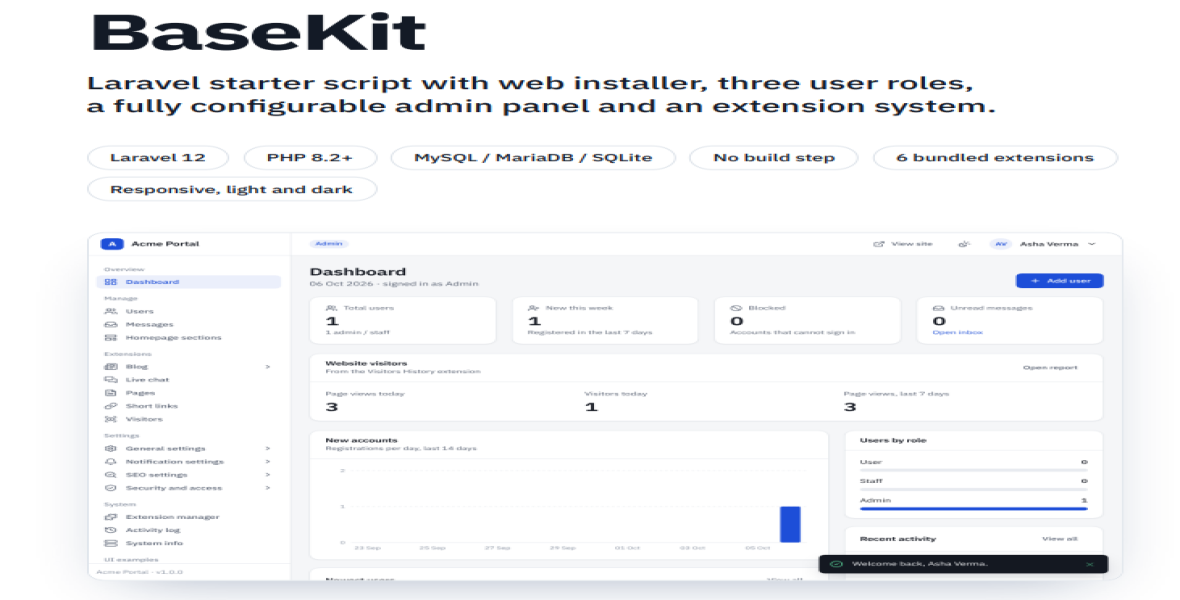
BaseKit helps developers, agencies, startups, product teams, and website owners start new web projects without rebuilding common functionality from scratch. It is built with Laravel 12 and includes a browser-based installation wizard that automatically checks server requirements, configures the environment, creates database tables, sets up the administrator account, installs selected extensions, and activates the license. The admin panel provides centralized control over users, site identity, branding, homepage sections, notifications, SEO, security, staff permissions, contact messages, activity logs, system tools, and extensions. The package also includes a complete user panel, responsive frontend, light and dark themes, customizable homepage sections, and six bundled extensions for Captcha, Live Chat, Short URLs, Visitor History, Blogs, and Pages.
BaseKit includes a guided web installer, user registration and authentication, password reset, optional email verification, configurable login lockout and password rules, three user roles—Admin, Staff, and User—with granular staff permissions, complete user management with search, filters, pagination, CSV export, profile management, blocking and activation, dynamic homepage sections with drag/reorder, show/hide, edit and delete options, configurable site settings, logo and favicon management, social links, maintenance mode, email and SMS notifications with editable templates, SMTP and custom HTTP SMS support, SEO settings with meta tags, Open Graph/X tags, sitemap, robots.txt, Search Console/Bing verification and analytics integration, contact inbox, activity logging, dashboard statistics and charts, demo mode, custom error pages, CSRF protection, hashed passwords, rate limiting and protected uploads. The extension system allows extensions to be installed, disabled, enabled, uninstalled or uploaded as ZIP packages, while the six bundled extensions provide Captcha, Live Chat, Short URL, Visitors History, Blogs and Pages functionality.
BaseKit requires PHP 8.2 or newer and supports MySQL 5.7+, MariaDB 10.3+ or SQLite 3. It can run on Apache with mod_rewrite and .htaccess enabled, including standard cPanel, XAMPP, WAMP and Laragon environments, and can also run on Nginx with the appropriate Laravel configuration pointing to the public folder. Required PHP extensions include PDO, PDO MySQL or PDO SQLite, mbstring, OpenSSL, tokenizer, JSON, ctype, fileinfo, XML and cURL; GD is recommended for the Captcha image and ZIP is recommended for uploading extensions. The application requires writable storage/, bootstrap/cache/, public/uploads/ and .env locations, with extensions/ writable when uploading extensions. Approximately 80 MB of disk space is required including the bundled vendor folder. A valid license code and outgoing HTTPS access to the license server are required for license activation. Composer, Node.js, npm, SSH access and cron jobs are not required.
To install BaseKit, upload and extract the package on your hosting server or local environment, create a database and database user where required, and open the website in a browser. The built-in installer automatically performs the server requirement check and guides you through database configuration, site name, URL, tagline, timezone, administrator account and bundled extension selection. After installation, enter the license code and license name provided with your purchase and verify the license online; the website and admin panel become available after successful activation. After signing in, configure the site identity, logo, favicon, brand colour, email/SMS settings, notification templates, homepage sections, Captcha, registration rules, staff permissions, SEO settings and website pages before going live. For production use, enable HTTPS, ensure APP_DEBUG=false, and maintain regular backups of the database and public/uploads folder. For cPanel installation, upload the ZIP through File Manager and extract it under public_html; for XAMPP/WAMP/Laragon, extract the package into the appropriate web directory and start Apache/MySQL before opening the local URL.


